

Going home with a CADD pump
This information explains what a CADD pump is, how it works and how to use it. Before you leave hospital, we will go through all this information with you and ensure you know what to do if you experience any problems. If you have further questions or would like more information, please contact us using the details at the end of this information sheet.
What is a CADD pump?
A CADD pump is a small device attached to an infusion bag containing your medication or fluids. This is placed into a backpack, which you or your parents/caregiver can carry.
The pump is connected to your central line, allowing you to safely receive your treatment outside of the hospital.
It can deliver medications or fluids continuously or as needed at certain times.
We program the pump to deliver the exact dose your team has prescribed. We will then lock the keypad so that the settings cannot be changed accidentally.
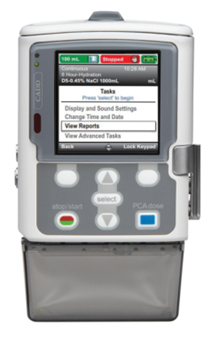
Important things to know about your CADD pump
Where should I put my pump?
Your pump will be placed into a bag or a pouch, which you or your parents/caregiver can carry. It can also be placed on the back of a wheelchair or pushchair.
When you are sitting down or going to bed, you can take your bag/pouch off and place it near you. We recommend positioning the pump at the same level as you. For example, if you are in bed, put the pump on a chair next to you. Please make sure the pump is upright at all times. This will allow your treatment to continue without interruptions.
You must always make sure that your lines are kept safe from being pulled or trapped e.g. under a wheelchair or in car doors. If there are small children or pets at home, please make sure the pump is always out of their reach.
Sleeping
Please follow the advice above regarding the position of your pump overnight. It is important that your pump is close by, so if the alarm goes off whilst you are sleeping you will hear this.
For younger children, you may wish to place a baby monitor next to the pump.
Bathing
When you have a bath or a shower, please place the pump on a nearby hook or chair. Water can damage the pump so please make sure it does not get wet.
Activities/Exercise
It is very important that you avoid any activity in which your line could become tangled/disconnected or would risk damaging the equipment e.g. playgrounds, swimming or contact sports. This is because there is a risk you could hurt yourself or damage the pump.
CADD pump features
Display
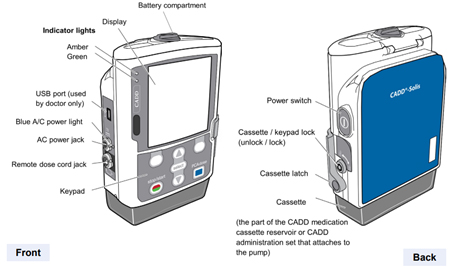
The display shows information and messages. It will turn itself off to save power after some time. You can press any key on the keypad to turn the display back on.
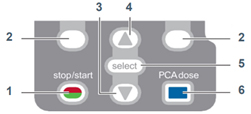
Keypad keys
- Starts and stops pump delivery.
- ‘Soft keys’ let you answer a question on the pump’s display. They also let you move through some of the pump’s screens.
- Allows you to scroll down menus.
- Allows you to scroll up menus.
- Selects a menu item.
- This key is not used for your treatment.
Indicator lights
- Green light – Flashing
Pump is running and delivering medication. - Amber light – Flashing
One or more of the following has happened:
– the pump has stopped.
– there is an alarm.
– the battery is low.
– the reservoir volume is low (the treatment bag is empty). - Amber light – Continuous
Pump is not working – you must contact the hospital immediately for advice. See contact details. - Green and amber light – Flashing
Pump is running, but something will need to be looked at soon. This could be:
– a low battery
– a low reservoir volume (the treatment bag will soon be empty) - Please see our troubleshooting section for more information on responding to CADD pump alerts.
Troubleshooting
How will I know if the CADD pump is working correctly?
We recommend that you visually check your CADD pump at least once a day. You should be able to see the amount of liquid in the bag or cassette gradually go down.
You can also look at the CADD pump device display. This shows the amount of fluid that still needs to be given. Please note, if you are receiving an intermittent infusion, this number will only go down at the time the infusion is programmed to start.
At the top of the screen, there should also be a green message that says ‘running’. If the message is red and says ‘stopped’ then the pump is not running. Please note, if you are having an intermittent infusion, the pump will display a countdown telling you when your infusion will start. For example, -When the pump is running, it will also make an intermittent gentle whirring sound. This means it is working correctly.
How do I charge the pump battery?
A rechargeable battery and charging cable will be provided with your CADD pump. The rechargeable battery will run for around 50 hours when fully charged. To avoid the battery running low, we recommend you plug the pump into a mains plug socket overnight and whenever you are not moving about. The connection point is on the side of the pump and will show a blue light when charging.
If the rechargeable battery fails, you will need to replace it with 4x AA batteries. Please see section on CADD Pump Alarms which outlines how to do this. We will give you a supply of batteries, which you should keep with you in your backpack.
What should I do if my CADD pump is not working?
You may be able to resolve some of the CADD pump alarms at home by following the guidance below. However, if you have any concerns, please contact us immediately. Our contact details are at the end of this information sheet.
Whilst you are connected to a CADD pump, all your care will take place in Leeds rather than at your local hospital.
What should I do if my line becomes disconnected?
If your line ever becomes disconnected, do not attempt to reconnect it. This could lead to a line infection.
- Clamp the line.
- Place a white cap (that you will have been given by the hospital) on the end of the line.
- Contact us immediately. You will need to come into hospital for the problem to be resolved.
What should I do if my infusion spills or leaks?
If the connection between your pump and line ever becomes loose or the line becomes damaged while the infusion is running, there is a risk of spill or leakage. Turn off the CADD pump using the ‘Power switch’ and call us immediately.
If your infusion contains chemotherapy
If your infusion contains chemotherapy and this has come into contact with your skin, please wash the affected area thoroughly with soap and running water. If there has been contact with your eyes, rinse thoroughly with water and 0.9% saline.
Important
We will provide you with a chemotherapy spillage kit and instructions on how to use it. You should keep this with you at all times.
CADD pump alarms
Low battery/battery depleted
- Plug the pump into charge and check it is still running
- If the pump will not charge you will need to replace the rechargeable battery with 4x AA batteries – always use new batteries and do not mix old and new batteries.
- Press the ‘Stop’ button and turn off the pump using the ‘Power switch’.
- Open the battery door, by turning the dial to the left (anticlockwise).
- Remove the rechargeable battery/old batteries and insert 4x new AA batteries (matching the + and – markings on the batteries with the markings on the pump).
- Close and lock the battery door, by turning the dial to the right (clockwise).
- Turn the power back on using the power switch. The display will ask if you want to start a new patient. Select ‘No’ and press ‘Start pump’.
- Please bring the charger and rechargeable batteries into the unit when you next attend.
Low reservoir volume
This alarm means your infusion has almost finished. This will usually be around 1 hour before the end of your infusion. Please press the ‘Acknowledge’ button and your pump will continue to deliver your treatment.
This alarm should only happen on the morning you are returning for your pump infusion to be changed. Please contact us immediately if this happens at any other time.
Reservoir volume is zero
This alarm means your infusion has finished. Please clamp the line and turn off the pump using the ‘Power switch’. If you were not expecting this alarm, please follow the instructions above and contact us immediately.
Downstream occlusion
This means there is an obstruction between you and your pump.
- Press the ‘Silence’ button.
- Press the ‘Help’ button and follow the instructions on screen. This may include:
– Checking your position.
– Checking your line is not clamped.
– Checking there are no kinks in the line.
– Checking there are no obstructions. - If you have managed to resolve the issue, the pump should restart. If it does not restart, please contact us immediately.
Upstream occlusion
This alarm means there is an obstruction between your infusion bag and the pump. Please ensure there are no obvious kinks in the line or obstructions. If you have managed to resolve the issue, the pump should restart. If it does not, please contact us immediately.
Air in line detected
- Clamp the line immediately.
- Press the ‘Silence’ button. Do not follow the instruction to prime the tubing. Only a trained professional can fix this.
- Turn the CADD pump off and contact us immediately. You will need to come into hospital for the problem to be resolved.
Useful contacts
Ambulatory Care Team (AC Nurses)


Children’s Haematology and Oncology Day Care Unit (CHODU)
Out of Hours Team (OWLS Nurse)
Ward 31
Ward 33
In an emergency
In an emergency dial 999 for an ambulance.